Hacked Website Repair & Malware Removal Australia

If your WordPress website has been hacked, every minute counts. A compromised site can damage your Google rankings, expose your customers to risk, redirect your visitors to spam pages, and get your domain blacklisted overnight. At Uniweb, we have been cleaning up hacked WordPress websites for Australian businesses for over 15 years. We diagnose the problem fast, remove every trace of malicious code, and harden your site so it does not happen again.

Get help now our process
image of a hacker with a laptop, hacked website repair services by uniweb

Our WordPress Hack Repair Services

We offer complete troubleshooting and repair services for all WordPress problems.

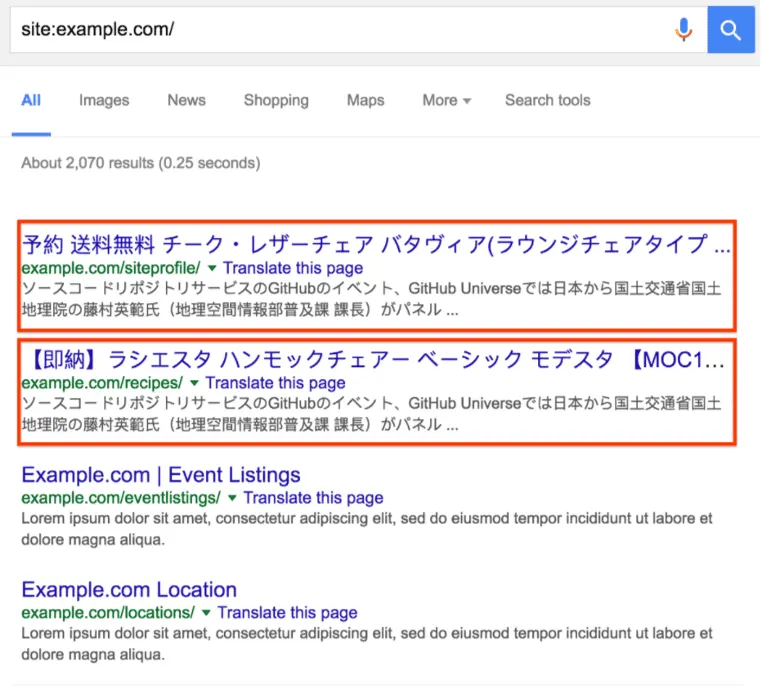
Japanese Keyword Hack Removal

The Japanese keyword hack is one of the most common WordPress attacks targeting Australian websites. Hackers inject thousands of auto-generated pages filled with Japanese characters into your site to manipulate Google rankings for their own benefit. These pages appear in Google Search Console and can devastate your SEO if not removed quickly. We locate and remove every injected page, clean your database, restore your sitemap, and submit a reconsideration request to Google to recover your rankings.

casino pharma hack removal service by uniweb

Casino & Pharma SEO Spam Cleanup

A common hack we see on Australian business websites involves injecting hidden links and pages promoting online casinos, gambling sites, or pharmaceutical products. These links are invisible to visitors but visible to Google, causing your site to be penalised for spam. We remove all injected content and restore your site’s SEO integrity.

White Screen of Death (WSOD) Fix

A White Screen of Death usually means a critical PHP error caused by a plugin conflict, theme issue, or corrupted core file. We diagnose the exact cause and restore your site’s functionality without losing any of your content or data.

Virus Removal

Malware can hide in WordPress core files, theme files, plugins, the database, and even in uploaded images. We perform a deep scan of your entire installation, identify all infected files, and remove every piece of malicious code without touching your legitimate content. Once cleaned, we verify the site is fully clear before handing it back to you.

Google Blacklist Removal

If Google has flagged your site as dangerous, visitors will see a warning page before they can access it, which effectively kills your traffic. We clean your site and submit a reconsideration request to Google’s Safe Browsing team to have the warning removed. Most blacklist removals are resolved within 1 to 3 days of cleanup.


wordpress security hardening services by uniweb

WordPress Security Hardening

After every cleanup we implement a full security hardening process to reduce the risk of future attacks. This includes file permission lockdown, admin login protection, two-factor authentication setup, removal of unused plugins and themes, web application firewall configuration, and ongoing monitoring setup.

Broken Layouts After Updates

Plugin, theme, or WordPress core updates sometimes break layouts, functionality, or entire sites. We identify the conflict, roll back where necessary, and restore your site to full working order while keeping everything updated and secure.


wordpress backdoor removal services by uniweb

WordPress Backdoor Removal

Hackers often leave hidden backdoors in your site so they can regain access even after a cleanup. These backdoors are disguised as legitimate files and are easy to miss if you do not know what to look for. We hunt down and eliminate every backdoor, then implement measures to prevent new ones from being planted.

wordpress website hack removal services by uniweb

Signs Your WordPress Website Has Been Hacked


Many business owners do not realise their site has been compromised until the damage is already done. Here are the most common warning signs to watch for:

  • Your website is redirecting visitors to unrelated or suspicious pages
  • Google is showing a “This site may be hacked” warning in search results
  • Your hosting provider has suspended your account due to malware
  • You notice content on your site that you did not add, including strange pages in Japanese, Chinese or other languages
  • A new admin user has appeared in WordPress that you did not create
  • Your website traffic has dropped suddenly and significantly
  • Visitors are seeing pop-ups, spam links or unusual advertisements
  • You cannot log in to your WordPress admin panel
  • Your Google Ads campaigns have been paused due to policy violations

If you are seeing any of these symptoms, contact us immediately. The longer a hack goes unaddressed, the more damage it causes to your rankings, your reputation and your customers.


If you are unsure whether your site has been compromised, you can run a free scan using Sucuri SiteCheck or install Wordfence to scan your files for malicious code. If anything suspicious comes up, contact us immediately.


CLEAN UP YOUR WEBSITE

Our Hack Repair Process

1
Step 1
Emergency Assessment
We assess your site immediately, identify the type of hack and extent of damage, and give you a clear picture before any work begins.
2
Step 2
Full Backup
Before touching anything we take a complete backup of all files and the database, giving us a safety net throughout the process.
3
Step 3
Deep Scan & Cleanup
We scan every file and database table, remove all malicious code, fake admin accounts and backdoors, then reinstall clean copies where needed.
4
Step 4
Security Hardening
Once clean we lock the site down. File permissions, firewall setup, login protection and automated backups are all put in place before handover.
5
Step 5
Google Recovery
If your site has been blacklisted by Google we submit reconsideration requests and monitor recovery until all warnings are fully removed.
6
Step 6
Handover & Report
We provide a full report of what was found, what was removed, and what was put in place. Your site is handed back clean, secure and ready to perform.

Why WordPress Sites Get Hacked?


WordPress powers over 40% of all websites on the internet, which makes it the most targeted platform for hackers worldwide. The most common reasons WordPress sites get compromised include:


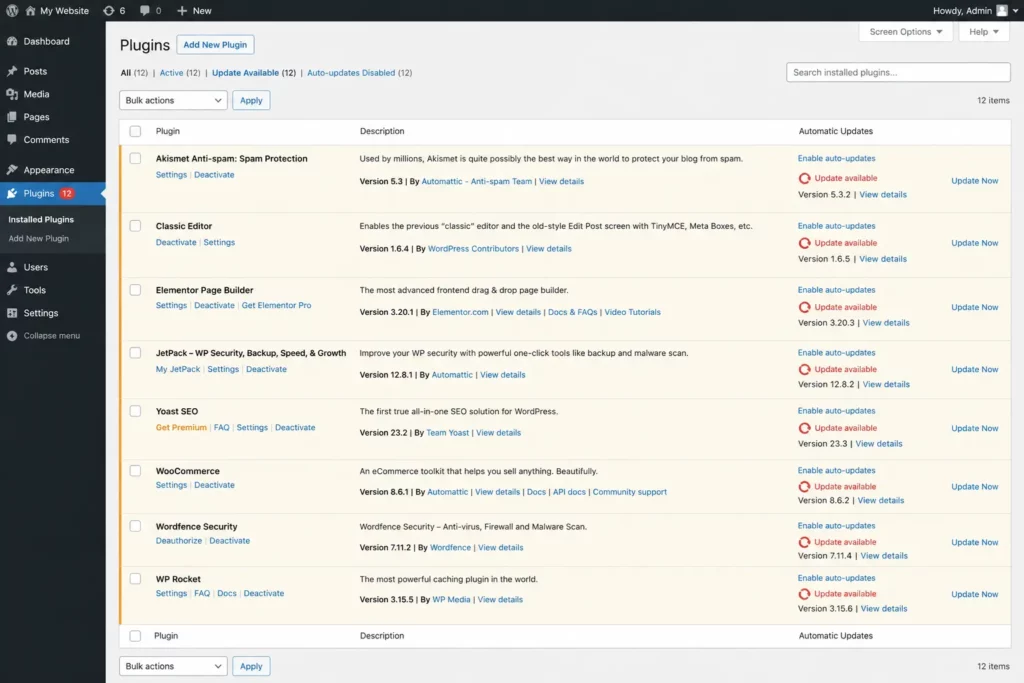
  • Outdated WordPress core, themes or plugins with known security vulnerabilities
  • Weak or reused admin passwords
  • Nulled or pirated themes and plugins containing pre-installed malware
  • Poor quality hosting with inadequate server-level security
  • Unused plugins and themes left installed but inactive
  • No two-factor authentication on admin accounts
  • No web application firewall or malware monitoring in place


Keeping your site updated and maintained is the single most effective way to reduce your risk. Our hosting and maintenance plans include proactive security monitoring so you are protected before a hack ever occurs.


get in touch
image showing the wordpress backend plugin section with update required

One Off Fix Or Ongoing Maintenance


We offer both one-off hack cleanup and repair for businesses that need an urgent fix, and ongoing hosting and maintenance plans for businesses that want continuous protection. Our maintenance clients receive proactive security monitoring, regular updates, automated backups, and priority support, meaning most security issues are caught and resolved before they ever become a problem.


View Our Hosting & Maintenance Plans

All your questions. Answered.

Can’t find what you’re looking for? Drop us a line and we’d be happy to answer any questions you have

Get in touch
How long does a WordPress hack cleanup take?

Most hacked WordPress site cleanups are completed within 24 hours of engagement. Complex infections involving multiple backdoors or database injections may take longer, but we will give you a clear timeframe after the initial assessment.

Will I lose my content during the cleanup?

No. We always take a full backup before starting any cleanup work. Our process is designed to remove malicious code while preserving all your legitimate content, pages, posts and images.

What is a Japanese keyword hack?

A Japanese keyword hack is an attack where hackers inject thousands of Japanese language pages into your WordPress site to manipulate Google search rankings. It appears in Google Search Console as pages you never created and can seriously damage your SEO if not removed quickly.

Can you remove my site from Google's blacklist?

Yes. Once your site is clean we submit a reconsideration request to Google’s Safe Browsing team. Blacklist removals typically take 1 to 3 days after the cleanup is complete.

How do I know if my site has been hacked?

Common signs include unexpected redirects, Google warnings in search results, a sudden drop in traffic, new admin users you did not create, or your hosting provider suspending your account. If you are unsure, contact us and we can assess your site.

How much does WordPress hack repair cost?

The cost depends on the type and extent of the hack. Contact us for a free assessment and we will give you a clear, no-obligation quote before any work begins.

How do I prevent my WordPress site from being hacked again?

Keep WordPress core, themes and plugins updated at all times, use strong unique passwords, remove unused plugins and themes, implement a web application firewall, and consider a professional maintenance plan that monitors your site regularly.